
The current work environment of data analytics requires users to process information with the same speed as they need to achieve precise results. The ability to identify trends through quick assessments becomes a critical asset for business performance analysis, user behavior monitoring, and report creation. An AI Graph Maker helps streamline this process by automating visualization and reducing manual effort. Traditional tools require users to complete manual tasks, which results in formatting problems and extends the time needed to produce charts.
The AI Graph Maker QuickGraph AI creates a new way to visualize data.
The data patterns require analysis because they reveal fundamental business information. The sales figures experience sudden increases which are followed by continuous customer engagement drops and seasonal sales patterns that control important business decisions. The speed of your signal detection process directly determines your response time.
However, spotting trends manually often involves:
These steps not only take time but also increase the risk of human error.
The AI Graph Maker enables complete process handling through its automated functions for creating charts and conducting analysis. You can create distinct visual content because the system generates professional graphs within a few seconds.
The system automatically selects the most suitable graph type when users input their dataset into QuickGraph AI. The AI system selects appropriate visualizations when it needs to choose between time-series data and comparison needs, which includes line charts and bar graphs.
This eliminates guesswork and allows you to focus directly on interpreting trends.
AI doesn’t just create charts it helps highlight patterns. It can quickly identify:
Instead of scanning rows of numbers, you get a visual summary that makes trends obvious at a glance.
Manual chart creation often leads to mistakes—wrong axis labels, incorrect data selection, or misleading visuals. An AI Graph Maker minimizes these risks by handling the technical details automatically.
This ensures your insights are based on accurate and reliable visuals.
When trends are easy to spot, decisions become faster and more confident. Businesses can:
Speed is critical, and AI-driven tools provide that edge.
Imagine you’re analyzing monthly website traffic. Traditionally, you would:
With QuickGraph AI, you simply upload the dataset, and within seconds, you see a clean visualization showing growth patterns, dips, and peaks.
Instead of manually creating charts, you can simply enter a prompt like:
“Compare the 2023 values as bars and their corresponding percentage change from the baseline as a line across all months..”
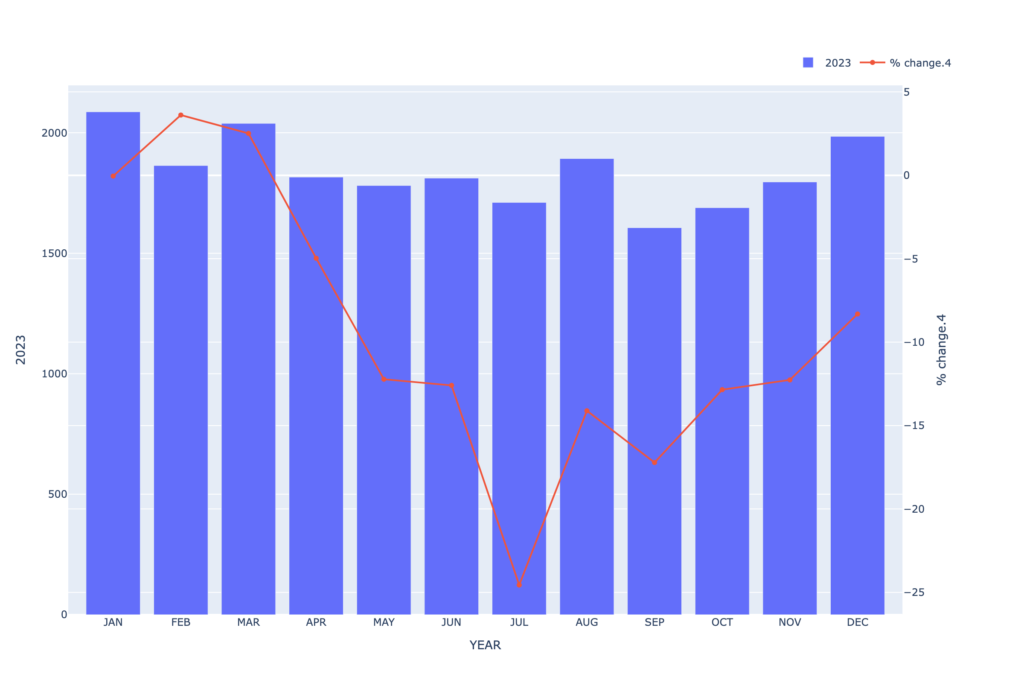
Within seconds, the AI Graph Maker generates a clean, professional chart that highlights key trends, spikes, and patterns automatically.
What used to take 20–30 minutes now takes less than a minute.
Not all tools are created equal. When choosing an AI Graph Maker, consider these features:
The tool should automatically choose the best visualization based on your data type.
Clarity is essential. Graphs should be easy to understand without extra adjustments.
Fast generation ensures you can analyze data on the go.
While automation is important, having the ability to tweak charts adds flexibility.
QuickGraph AI combines all these features, making it a strong choice for anyone looking to streamline data analysis.
An AI Graph Maker is useful across multiple roles:
No matter your level of expertise, AI simplifies complex data into actionable insights.
The rising volume of data will create operational challenges for manual methods which will reach their maximum capacity during upcoming months. The modern workplace needs AI-powered tools because they deliver essential benefits that extend beyond their use as basic tools.
Using the AI Graph Maker QuickGraph AI helps you save time while you enhance your ability to understand and use data.
QuickGraph AI achieves exceptional performance through its combination of rapid processing and precise results and user-friendly operations. You can concentrate on your essential work of trend analysis and decision-making when you use this tool because it eliminates the need to navigate through spreadsheets.
Businesses that operate in today’s data-driven environment must implement AI Graph Maker technology as their essential growth strategy.
