How to Spot Data Trends Fast with an AI Graph Maker?

The current work environment of data analytics requires users to process information with the same speed as they need to achieve precise results. The ability to identify trends through quick assessments becomes a critical asset for business performance analysis, user behavior monitoring, and report creation. An AI Graph Maker helps streamline this process by automating visualization and reducing manual effort. Traditional tools require users to complete manual tasks, which results in formatting problems and extends the time needed to produce charts.

The AI Graph Maker QuickGraph AI creates a new way to visualize data.

Why Trend Detection Matters?

The data patterns require analysis because they reveal fundamental business information. The sales figures experience sudden increases which are followed by continuous customer engagement drops and seasonal sales patterns that control important business decisions. The speed of your signal detection process directly determines your response time.

However, spotting trends manually often involves:

  • Cleaning and organizing datasets
  • Choosing the right chart type
  • Adjusting formatting and labels
  • Interpreting visuals

These steps not only take time but also increase the risk of human error.

How an AI Graph Maker Speeds Things Up?

The AI Graph Maker enables complete process handling through its automated functions for creating charts and conducting analysis. You can create distinct visual content because the system generates professional graphs within a few seconds.

1. Instant Data Visualization

The system automatically selects the most suitable graph type when users input their dataset into QuickGraph AI. The AI system selects appropriate visualizations when it needs to choose between time-series data and comparison needs, which includes line charts and bar graphs.

This eliminates guesswork and allows you to focus directly on interpreting trends.

2. Automatic Pattern Recognition

AI doesn’t just create charts it helps highlight patterns. It can quickly identify:

  • Upward or downward trends
  • Sudden spikes or drops
  • Seasonal patterns
  • Outliers

Instead of scanning rows of numbers, you get a visual summary that makes trends obvious at a glance.

3. Reduced Human Error

Manual chart creation often leads to mistakes—wrong axis labels, incorrect data selection, or misleading visuals. An AI Graph Maker minimizes these risks by handling the technical details automatically.

This ensures your insights are based on accurate and reliable visuals.

4. Faster Decision-Making

When trends are easy to spot, decisions become faster and more confident. Businesses can:

  • Adjust strategies in real-time
  • Identify opportunities early
  • Respond to risks before they escalate

Speed is critical, and AI-driven tools provide that edge.

Practical Example

Imagine you’re analyzing monthly website traffic. Traditionally, you would:

  1. Import data into a spreadsheet
  2. Select a chart type
  3. Customize labels and formatting
  4. Review the graph for trends

With QuickGraph AI, you simply upload the dataset, and within seconds, you see a clean visualization showing growth patterns, dips, and peaks.

Instead of manually creating charts, you can simply enter a prompt like:

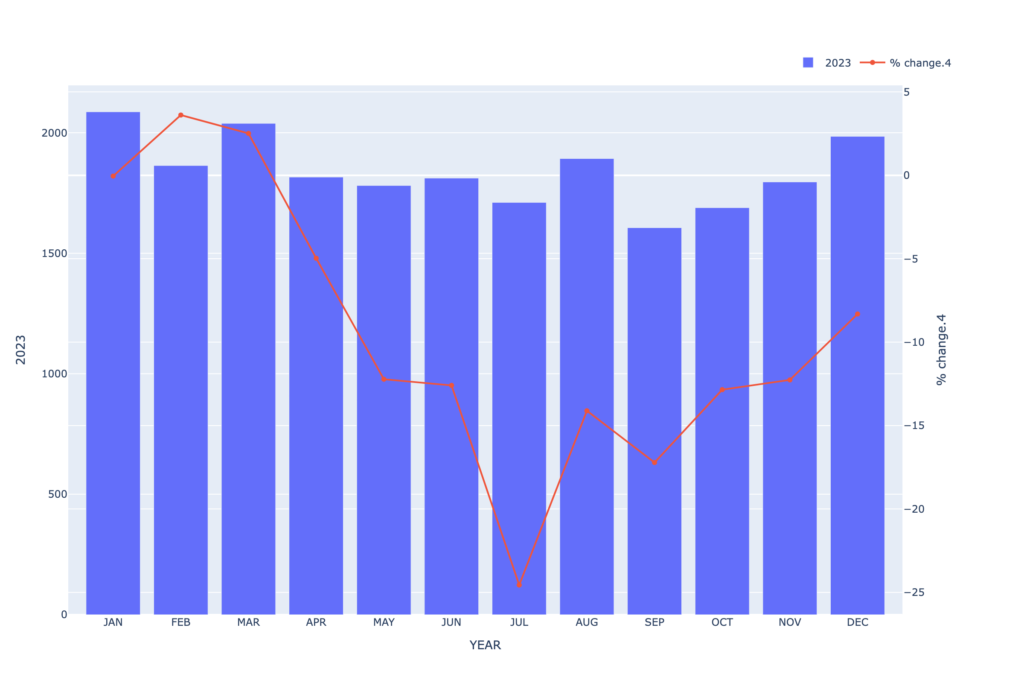
“Compare the 2023 values as bars and their corresponding percentage change from the baseline as a line across all months..”
the AI Graph Maker

Within seconds, the AI Graph Maker generates a clean, professional chart that highlights key trends, spikes, and patterns automatically.

What used to take 20–30 minutes now takes less than a minute.

Key Features to Look for in an AI Graph Maker

Not all tools are created equal. When choosing an AI Graph Maker, consider these features:

Smart Chart Selection

The tool should automatically choose the best visualization based on your data type.

Clean and Readable Design

Clarity is essential. Graphs should be easy to understand without extra adjustments.

Real-Time Processing

Fast generation ensures you can analyze data on the go.

Customization Options

While automation is important, having the ability to tweak charts adds flexibility.

QuickGraph AI combines all these features, making it a strong choice for anyone looking to streamline data analysis.

Who Can Benefit?

An AI Graph Maker is useful across multiple roles:

  • Marketers tracking campaign performance
  • Analysts working with large datasets
  • Students learning data visualization
  • Business owners making data-driven decisions

No matter your level of expertise, AI simplifies complex data into actionable insights.

The Future of Data Analysis

The rising volume of data will create operational challenges for manual methods which will reach their maximum capacity during upcoming months. The modern workplace needs AI-powered tools because they deliver essential benefits that extend beyond their use as basic tools.

Using the AI Graph Maker QuickGraph AI helps you save time while you enhance your ability to understand and use data.

Conclusion

QuickGraph AI achieves exceptional performance through its combination of rapid processing and precise results and user-friendly operations. You can concentrate on your essential work of trend analysis and decision-making when you use this tool because it eliminates the need to navigate through spreadsheets.

Businesses that operate in today’s data-driven environment must implement AI Graph Maker technology as their essential growth strategy.
Why Analysts Are Switching to AI Graph Maker Tools?

The current data-driven world presents analysts with excessive data which exceeds their ability to manage it. The real challenge of data analysis emerges when analysts attempt to convert their spreadsheets and complex datasets into understandable and practical insights. The process of making charts and graphs through traditional methods creates delays in this workflow.

The increasing number of analysts who adopt AI graph maker tools demonstrates their value to QuickGraph AI. The data visualization tools from these platforms enable users to enhance their productivity while creating new methods for displaying and understanding information.

The Problem with Traditional Chart Creation

Analysts have used manual tools since they began analyzing data which includes spreadsheets and advanced visualization programs. The tools provide strong capabilities but present multiple operational difficulties which include:

  • Time-consuming setup
  • Manual formatting and adjustments
  • Choosing the right chart type
  • Risk of human errors
  • Difficulty in explaining insights clearly

Analysts who possess expertise need to spend several hours on chart improvements which should require only a few minutes. This issue becomes critical when projects have approaching deadlines.

What’s Changing with AI Graph Maker Tools?

The design of AI graph makers enables users to create visual data representations without facing any obstacles. Users need to input their data or describe their requirements instead of selecting chart types and formatting axes and adjusting layouts.

Tools like QuickGraph AI allow analysts to:

  • Generate charts instantly using prompts
  • Automatically choose the best visualization type
  • Apply clean, professional styling
  • Reduce errors in interpretation
  • Focus more on insights rather than design

The name of the shift is one of convenience or comfort but of efficacy and intelligibility.

Scenario 1: Tight Deadlines in Business Reporting

Imagine an analyst working on a monthly performance report. The dataset is ready, but creating multiple charts for revenue, growth trends, and customer behavior takes hours.

With an AI graph maker, the same analyst can input prompts like:

Example Prompt:
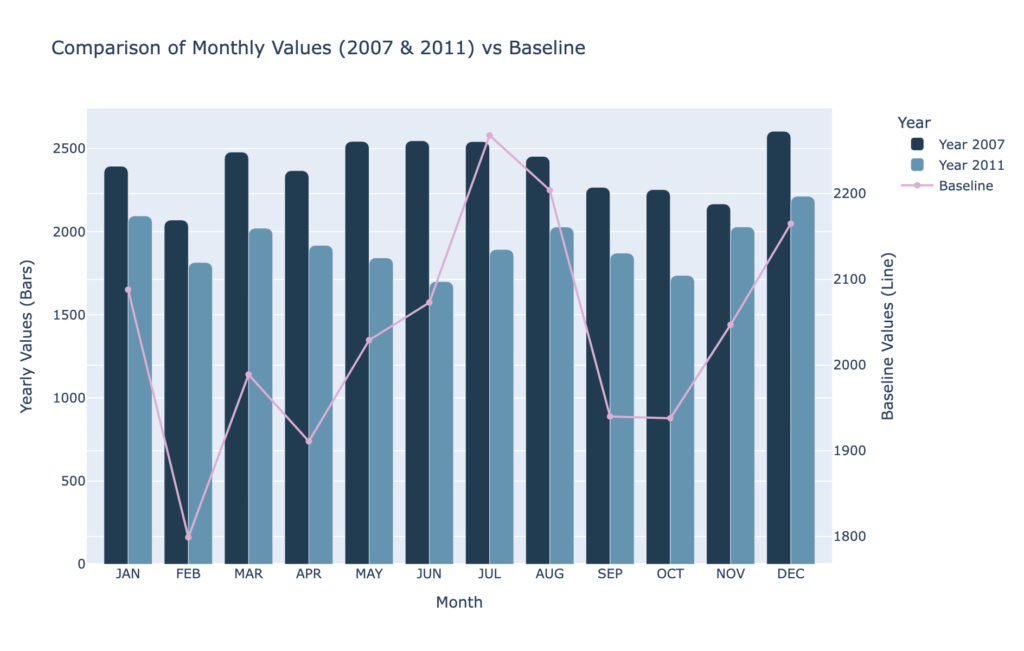
“Draw a dual chart comparing baseline, 2007 and 2011.”

Within seconds, QuickGraph AI generates a clear dual comparison chart, making it easy to analyze differences across time periods without manually building multiple visuals.

This saves valuable time and allows the analyst to focus on interpreting results rather than building visuals.

Scenario 2: Non-Designers Creating Professional Charts

Not every analyst has a design background. Many struggle with making charts look visually appealing and easy to understand.

AI tools solve this by automatically applying best practices in visualization:

  • Proper spacing and alignment
  • Clear labels and titles
  • Color consistency
  • Readable layouts

With QuickGraph AI, even beginners can create charts that look presentation-ready without needing design skills.

Scenario 3: Reducing Human Errors

Manual chart creation often leads to small but critical mistakes:

  • Incorrect data selection
  • Misaligned axes
  • Wrong chart types
  • Inconsistent formatting

These errors can mislead decision-making.

AI graph makers reduce these risks by automating the process. The system analyzes the data and suggests the most accurate visualization, ensuring consistency and correctness.

Scenario 4: Faster Decision-Making

In many industries, speed matters. Whether it’s finance, marketing, or operations, decisions often depend on how quickly insights are presented.

AI graph tools enable real-time visualization. Analysts can instantly generate charts during meetings or discussions, making it easier to:

  • Explain trends
  • Highlight key metrics
  • Support arguments with visuals

This leads to faster and more confident decision-making.

Scenario 5: Handling Complex Data Easily

Large datasets with multiple variables can be difficult to visualize manually. Choosing the right chart type becomes confusing.

AI tools simplify this by analyzing the structure of the data and automatically selecting the most suitable format whether it’s a scatter plot, bar chart, or line graph.

With QuickGraph AI, users don’t need to overthink technical decisions. The tool does the heavy lifting.

Why Analysts Prefer AI Over Traditional Tools

The shift toward AI graph makers is not just a trend it’s a practical choice driven by real benefits:

1. Time Efficiency

What once took hours can now be done in seconds.

2. Ease of Use

No steep learning curve or technical expertise required.

3. Accuracy

Reduced chances of manual errors.

4. Better Communication

Clear and visually appealing charts improve understanding.

5. Scalability

Handle large and complex datasets effortlessly.

The Role of QuickGraph AI in This Shift

Among the growing number of AI tools, QuickGraph AI stands out by focusing on simplicity and speed. It is designed specifically for users who want quick, reliable, and high-quality visualizations without complications.

Instead of navigating multiple settings, users can simply describe their needs. The tool transforms that input into a clean, meaningful chart almost instantly.

This makes it ideal for:

  • Business analysts
  • Students and researchers
  • Marketers
  • Startup teams

Anyone who works with data can benefit from this approach.

The Future of Data Visualization

As AI continues to evolve, the way we interact with data will become even more intuitive. Analysts will spend less time on technical tasks and more time on strategy and insights.

AI graph maker tools are just the beginning of this transformation.

The future is not about replacing analysts it’s about empowering them.

Conclusion

Analysts have started using AI graph creation tools because these tools resolve actual problems which include their need to work within time limits and handle complicated tasks and present their results in understandable ways. QuickGraph AI enables users to spend their time on essential tasks which involve understanding and presenting their research findings because it automates repetitive work associated with data visualization.

The current situation requires organizations to implement advanced technological solutions because data volumes continue to expand at unprecedented rates. The organization requires advanced tools because they have become critical to their operations.

AI graph creation software has emerged as the preferred solution for organizations.

When Should You Use an AI Graph Maker Instead of Traditional Tools?  

Graph creation stands as an essential data analysis task. Graphs serve as effective tools for presenting numerical data in business reports and school projects and marketing analyses and sales presentations. 

People have used standard tools like spreadsheets and manual chart software to create graphs throughout history. The tools maintain their functionality. However, AI graph maker have introduced a new method for data visualization which has transformed our data presenting methods. 

1. When You Want to Save Time 

Traditional tools require multiple steps: 

  • Enter data manually 
  • Select chart type 
  • Adjust labels 
  • Fix formatting 
  • Check errors 

This process can take a lot of time. 

If you are working under deadlines, an AI graph maker like QuickGraph AI can create charts in seconds. You simply upload your data or type a prompt, and the tool generates the graph automatically. 

If speed matters → choose AI. 

2. When You’re Not Sure Which Graph to Use 

Many people struggle with choosing the correct chart type. 

Should it be: 

  • Bar graph? 
  • Line chart? 
  • Pie chart? 
  • Scatter plot? 

Using the wrong graph can confuse your audience. 

An AI graph maker studies your data pattern and suggests the best visualization automatically. This removes guesswork and improves clarity. 

If you feel confused about chart selection → choose AI. 

3. When You Want Fewer Errors 

Manual graph creation often leads to: 

  • Wrong scaling 
  • Missing labels 
  • Data entry mistakes 
  • Formatting problems 

Even small mistakes can change the meaning of your data. 

AI tools reduce these risks because they analyze and organize data automatically before generating the graph. 

If accuracy is important → choose AI. 

4. When You Need Professional-Looking Graphs 

Traditional tools sometimes create basic or outdated designs unless you manually customize everything. 

AI graph makers create clean, modern, and visually appealing charts instantly. 

This is useful for: 

  • Client presentations 
  • Investor meetings 
  • Business dashboards 

If you want your reports to look premium → choose AI. 

5. When You Want to Convert Text Into a Graph 

One powerful feature of AI tools is text-to-graph creation. 

For example, you can type: 
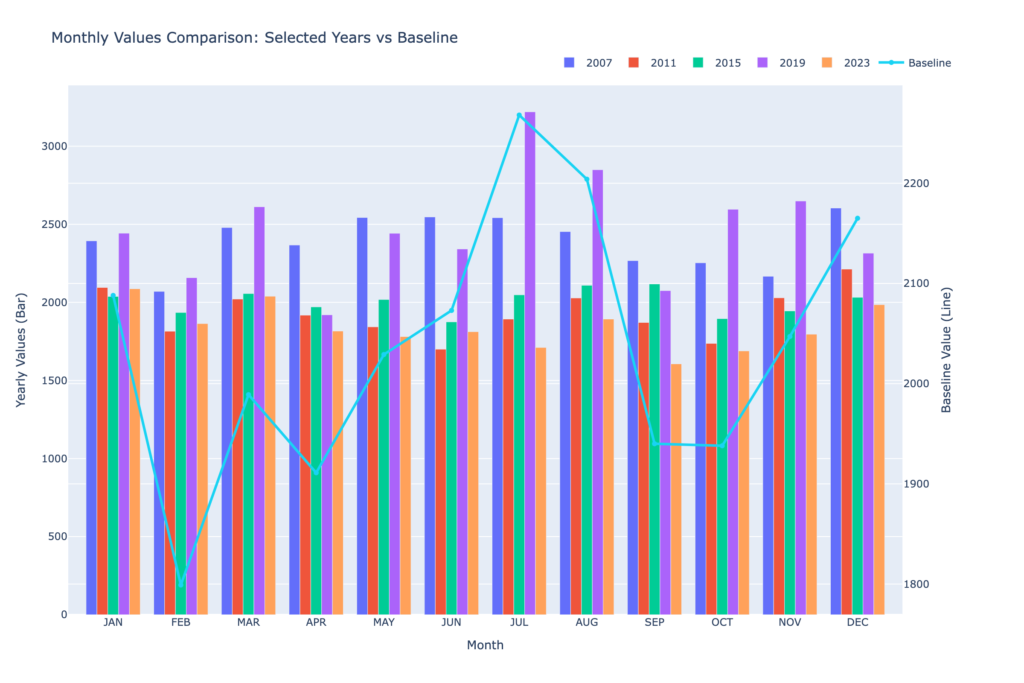
“Compare the monthly values for 2007, 2011, 2015, 2019, and 2023 using bars, while overlaying the Baseline as a line graph.” 

And the tool will generate the graph automatically. 

Traditional tools cannot understand text instructions. You must manually create everything. 

If you prefer simple text commands → choose AI. 

6. When You Work With Large or Complex Data 

Handling large datasets in traditional tools can feel overwhelming. 

Sorting, filtering, and analyzing data manually takes effort. 

AI graph makers help by: 

  • Detecting patterns 
  • Highlighting trends 
  • Identifying outliers 
  • Suggesting insights 

This makes data analysis smarter and easier. 

If your data is complex → choose AI. 

7. When You Want Better Productivity 

Business owners, marketers, and analysts need fast reporting. 

Using traditional tools repeatedly can slow down workflow. 

AI tools like QuickGraph AI help teams: 

  • Generate reports faster 
  • Share visualizations easily 
  • Improve collaboration 
  • Focus more on strategy instead of formatting 

If productivity matters → choose AI. 

8. When Should You Still Use Traditional Tools? 

AI graph makers are powerful, but traditional tools are still useful in some cases: 

  • When you need deep manual customization 
  • When working offline without internet 
  • When following strict company software policies 
  • When making very simple, basic charts 

If your needs are very basic and you enjoy manual control, traditional tools may still work. 

AI Graph Maker vs Traditional Tools: Quick Comparison 

Feature AI Graph Maker Traditional Tools 
Speed Very fast Slower 
Chart Suggestions Automatic Manual selection 
Error Reduction High Depends on user 
Design Quality Modern & clean Basic unless customized 
Ease of Use Beginner-friendly Requires knowledge 

AI focuses on automation and smart decisions. 
Traditional tools depend fully on user skills. 

Why More Businesses Are Switching to AI 

Companies today want: 

  • Faster insights 
  • Clear reports 
  • Strong presentations 
  • Better decision-making 

AI graph makers help businesses stay competitive. Instead of spending hours creating charts, teams can focus on analyzing results and planning growth. 

Tools like QuickGraph AI are designed to make data visualization simple for everyone not just experts. 

Final Thoughts 

You should use an AI graph maker instead of traditional tools when: 

  • You want to save time 
  • You are unsure about chart selection 
  • You want fewer mistakes 
  • You need professional visuals 
  • You work with large datasets 
  • You want better productivity 

Traditional tools are not outdated, but AI makes the process smarter and faster. 

In today’s fast-moving world, smart tools give you an advantage. 

If you want better graphs, better insights, and better results switching to an AI graph maker like QuickGraph AI is a smart move.